
Manage the build, not the chat.
Bennch is the workspace for software projects built with Claude Code. It turns your build into a clear plan that Claude works from, so you can see what’s planned, what’s being built, what needs your decision and what’s actually been checked.
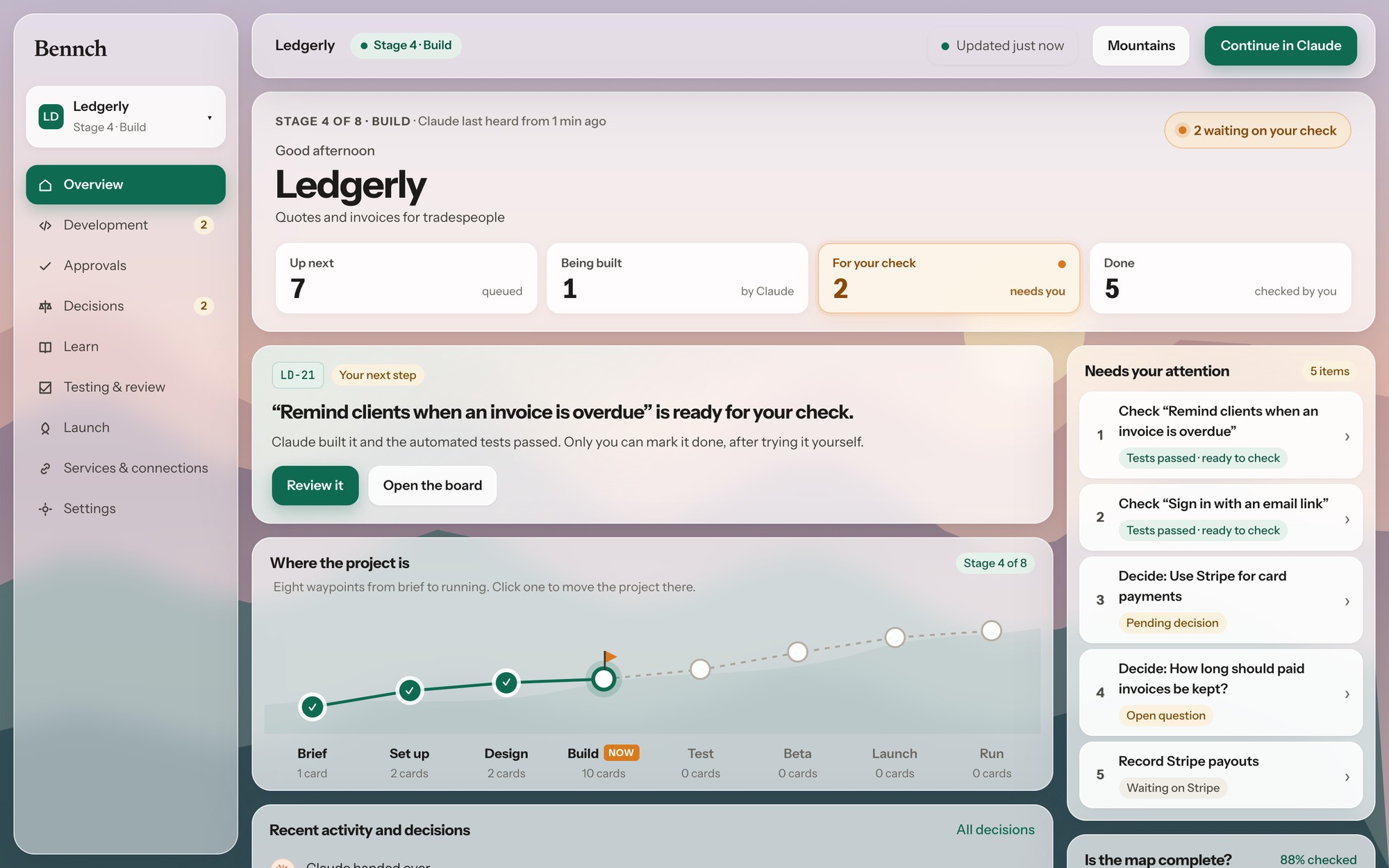
Ledgerly, an example project in Bennch: the next step, what needs you and where the build stands.
Claude Code writes the code. Bennch keeps the project on track.
Building fast is the easy part now. Knowing where the project stands is what gets hard.
The whole project, every session.
Decisions, the plan and links to your designs live with the project, not in old chats. Each new Claude session picks up where the last one ended.
Claude builds what you approved.
Claude works from cards you’ve approved. Extra ideas come back as proposals, and important choices come to you as questions.
Done means you’ve checked it.
Each card shows its commits, its tests and which platforms they covered. Only you accept the work.
Your cards are the instructions.
Every piece of work is a card. Claude Code picks up an approved card through Bennch, builds what it describes and hands it back with evidence. You decide whether it’s accepted.
Up next 1
Claude takes the top card first
Sign in with an email link
iOSAndroid
○ A link works once, then expires in 15 minutes
○ The link opens the app on iPhone and Android
Claude is building 1
Claude moves cards here when it starts
Sign in with an email link
iOSAndroid
3 commits so far
Tests passing on shared code and iPhone
Your check 1
Built. Only you can finish these
Sign in with an email link
iOSAndroid
4 commits · 6 files · tests passed
Android not tried on a device yet
1You approve the card
What it’s for, how you’ll know it works and where it runs. Bennch won’t let Claude start a card you haven’t approved.
2Claude Code builds it
Each commit names the card. Claude is instructed to stay inside it: extra ideas come back as proposals, and important choices come to you as questions.
3You check the proof
Test the journey on your own devices. Cards whose steps pass are accepted; a failed step goes back to its card with your note. Only you accept work.
More than a task board.
The plan, the decisions, the code and the tests stay connected from the first card to launch.
A plan that covers the whole product.
Take Ledgerly, an invoicing app for tradespeople. It has a phone app, a page where clients pay, and a backend. Each card belongs to one of those parts, sits on a board for its kind of work, such as design, backend or security, and says where it runs: iOS, Android or web.
So you can see the whole product at once, or just the phone app’s next few cards, and have Claude build them in order.


Decisions stay with the work.
When a choice is yours, such as how data is stored, payments or security, Claude asks with options and a suggestion instead of deciding.
Your answers stay on record for every later session. Cards link to where their designs live, like a Figma file, so Claude has the reference when it builds.
Pick up where you left off.
The Overview shows the next step, what’s waiting on you and where the build stands. Every new Claude session is given the plan and the last handover, and work a session left half-done is picked up first, so you’re not explaining the project again.


Evidence attached to what was built.
Each card shows its commits, the tests Claude reported and your CI result, including which platforms the tests covered. Work that grows far beyond its card is flagged.
For whole journeys, like sending an invoice and getting paid, Claude writes a step-by-step test guide linked to the cards it tests. You run it on your own devices: cards whose steps pass are accepted, and a problem goes back to the card that built it. Cards nobody can try by hand are accepted on their passing tests, together.
From an idea, or from what you’ve built.
Bring Bennch in on day one or halfway through. You don’t choose: Claude looks at your folder and starts the right way.
Plan it with Claude
Claude asks what you’re building, who it’s for and what the first version must do, plays back a short brief, then proposes the cards. Nothing is built until you approve.
Claude: “What are we building?”
Bring in what’s built
Claude maps your repo. What’s already built comes to you to accept in one go, and new cards are only for what’s missing.
Claude: “This folder has code, so I’ll map what’s built and what’s left.”
Connect in a few minutes.
Join the waitlist
We’ll email you an invite to app.bennch.co.uk. A short practice project shows you how everything works.
Connect Claude Code once
Add Bennch as a connector on claude.ai, or run one command. It works for all your projects. No keys to copy.
Paste the start prompt
Open Claude Code in your project’s folder and paste the prompt Bennch gives you. An empty folder: Claude plans it with you. Existing code: it maps it.
claude mcp add --transport http --scope user workbench https://app.bennch.co.uk/mcpWorks with the tools you already use
Claude Code
Works from your approved cards over MCP and reports what it did. Bennch runs no AI of its own.
GitHub
Commits that name a card appear on it, with their size and your Actions result. If Claude says tests passed but CI failed, the card shows it.
GitLab
Coming soonCommits, pipelines and change size on each card, for projects on GitLab.
Sentry
Coming soonA new error after a release shows on the card that shipped it, and can become a proposed card for you to approve.
Every connection is read-only.
What Bennch enforces.
- Your code stays on your computerBennch keeps your plan and what Claude reports: commits, tests and results. It never stores your source code.
- Only you accept workClaude’s connection can’t approve cards, answer your decisions or mark anything done.
- Secrets are refusedValues that look like API keys or tokens are rejected on cards and in prompts.
- Read-only integrationsBennch only reads from the tools you connect, such as GitHub. It never changes your code or settings there.
- Invite-only for nowEarly access is by invitation from the waitlist. You sign in with your email and password, plus an authenticator app if you turn it on.
Questions.
Do I need Claude Code?
Yes. Claude Code does the building. Bennch holds the plan, the decisions and the evidence.
Does Bennch run AI?
No. Everything Claude does happens in your own Claude Code session.
Will Claude always stick to the cards?
Claude is instructed to work one approved card at a time and to propose anything extra. Bennch enforces the approvals and shows what changed, but it can’t guarantee what Claude writes. That’s why you check each card before accepting it.
Where is my data?
Your code stays in your repo. Bennch stores your project’s cards, decisions and history.